Streamlining Construction Site Reporting with the BuildMonitor Mobile App by Concolabs

Concolabs Editorial
Concolabs Editor

Concolabs provides the BuildMonitor Mobile App to solve the burden of manual site documentation. By allowing site personnel to record progress through photos, quantities, and activities on mobile, the app generates daily progress reports automatically. This tool ensures that your project documentation matches contract requirements without the need for additional administrative input.
Key Takeaways
- BuildMonitor Mobile App automates the creation of daily progress reports directly from site data.
- Site personnel can record photos, quantities, and activities in real-time.
- The system ensures reports align with specific contract formats.
- Manual data entry is eliminated, reducing the risk of reporting errors.
What is the BuildMonitor Mobile App?
The BuildMonitor Mobile App is a specialized tool developed by Concolabs for the construction stage. It functions as a digital bridge between site activities and administrative reporting. Instead of relying on paper logs or spreadsheets, site teams input data directly into the mobile interface. The software then processes this information to produce professional reports that meet strict contractual standards common in the Middle East and Sri Lanka.
How does the app simplify site data collection?
Simplification occurs by focusing on three core inputs: photos, quantities, and activities. When a site engineer or supervisor captures an image or logs a quantity, the BuildMonitor Mobile App organizes this data into a structured format. This removes the need for end-of-day office work. By capturing data as it happens, the team ensures [INTERNAL-LINK: accurate site records -> /learnmore/buildmonitor] are maintained throughout the construction lifecycle.
Why is automated report generation critical for contractors?
Automated report generation is critical because it ensures consistency and compliance. Many contracts in the Middle East and Sri Lanka demand specific formats for daily progress reports. Manual creation often leads to delays or missing information. Concolabs designed this app to ensure that once site data is entered, the output is ready for submission, saving hours of administrative overhead every week.
Can AI replace professional site management judgement?
While the BuildMonitor Mobile App automates the documentation process, it does not replace the professional judgement of site managers. AI tools are designed to organize and format data, but they rely on the accuracy of the human input provided. Professionals must still verify that the recorded quantities and site conditions reflect the reality on the ground before finalizing any report for contractual use.
How to implement BuildMonitor on your project site?
Implementation begins with training site personnel on the mobile interface. Once the team understands how to log activities and upload photos, the next step is configuring the report templates to match your specific contract requirements. Concolabs supports this setup to ensure that the transition from manual logs to digital reporting is smooth and that the data captured is useful for [INTERNAL-LINK: project tracking -> /learnmore/buildmonitor].
BuildMonitor Site Readiness Checklist
- Define reporting frequency for site personnel
- Verify mobile device compatibility for all site staff
- Configure contract-specific report templates in the app
- Establish a process for daily data review by project managers
- Train team on photo documentation standards
- Confirm internet connectivity requirements for sync
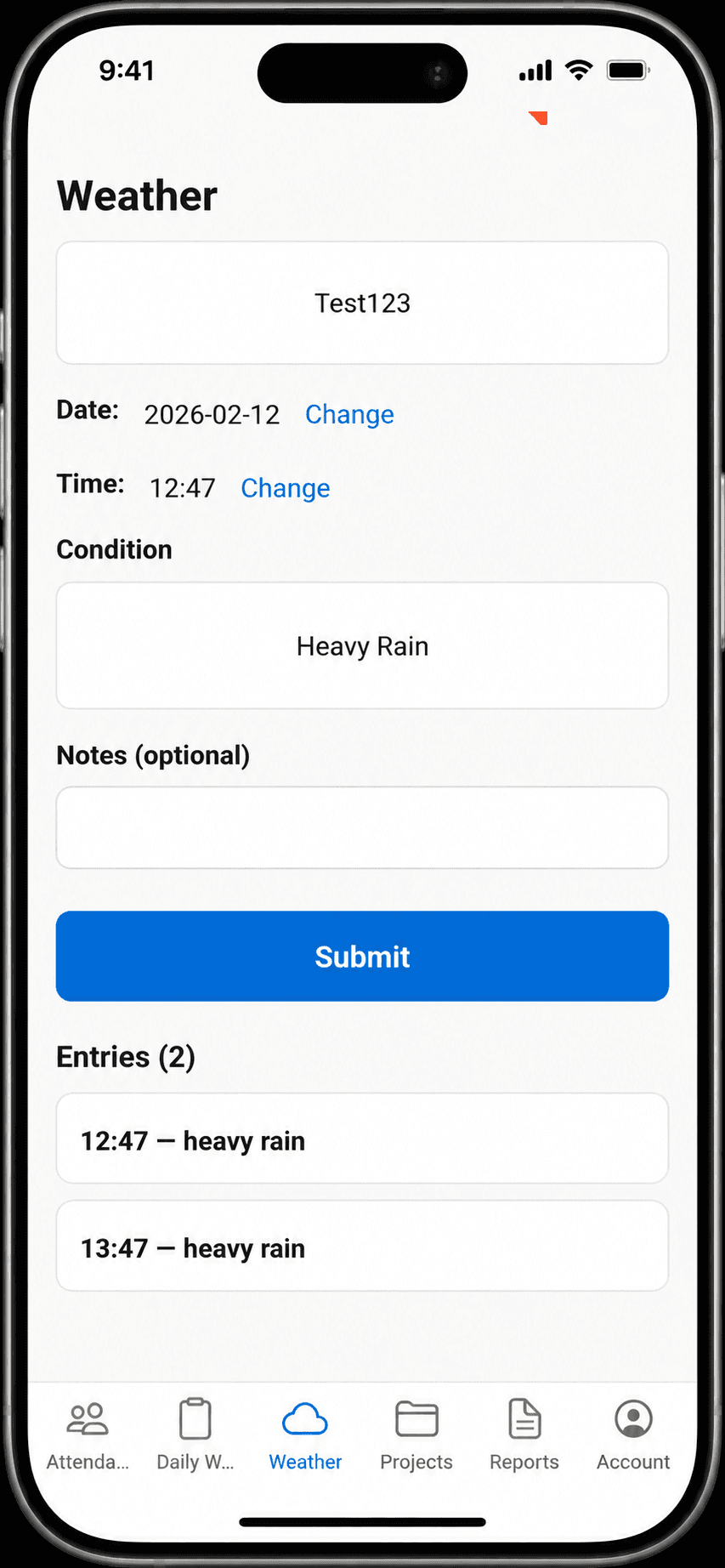
Evidence required before publishing: Evidence required before publishing: A screenshot of the BuildMonitor Mobile App interface, a sample daily progress report generated by the app, and a testimonial from a project manager in the Middle East or Sri Lanka.
Frequently Asked Questions
Does the BuildMonitor Mobile App require constant internet access?
The app is designed to function on-site, allowing data entry even in areas with limited connectivity. It syncs the recorded information to the central system once a stable connection is established, ensuring that no data is lost during the workday.
Can I customize the format of the daily progress reports?
Yes, the BuildMonitor Mobile App is built to generate reports in your contract's required format. During the setup phase, Concolabs works with you to ensure the output aligns with the specific documentation standards mandated by your project agreements.
Is the app suitable for large-scale construction projects?
The app is specifically designed for construction environments where daily reporting is mandatory. It scales to handle multiple site personnel recording data simultaneously, providing a centralized view of progress for project managers and stakeholders.
What happens if a site engineer enters incorrect data?
The app provides a review layer where project managers can verify the inputs before the final report is generated. While the app automates the formatting, human oversight remains a necessary step to ensure the accuracy of the recorded quantities and activities.
How does Concolabs ensure data security for my project?
Concolabs prioritizes the security of construction data by implementing robust encryption and access controls. Project information recorded via the BuildMonitor Mobile App is stored securely, ensuring that only authorized personnel can view or edit sensitive site documentation.
What should the reader do next?
The BuildMonitor Mobile App by Concolabs offers a practical solution to the persistent challenge of daily reporting in construction. By digitizing site inputs and automating the report generation process, it allows contractors to focus on project execution rather than paperwork. To see how this tool can fit your specific project needs, visit our [INTERNAL-LINK: BuildMonitor product page -> /learnmore/buildmonitor].
Review the workflow with the Concolabs team, confirm the required inputs and professional review points, then explore BuildMonitor Mobile App.