BuildMonitor Mobile App
DPR written automatically.
During the day, not after.
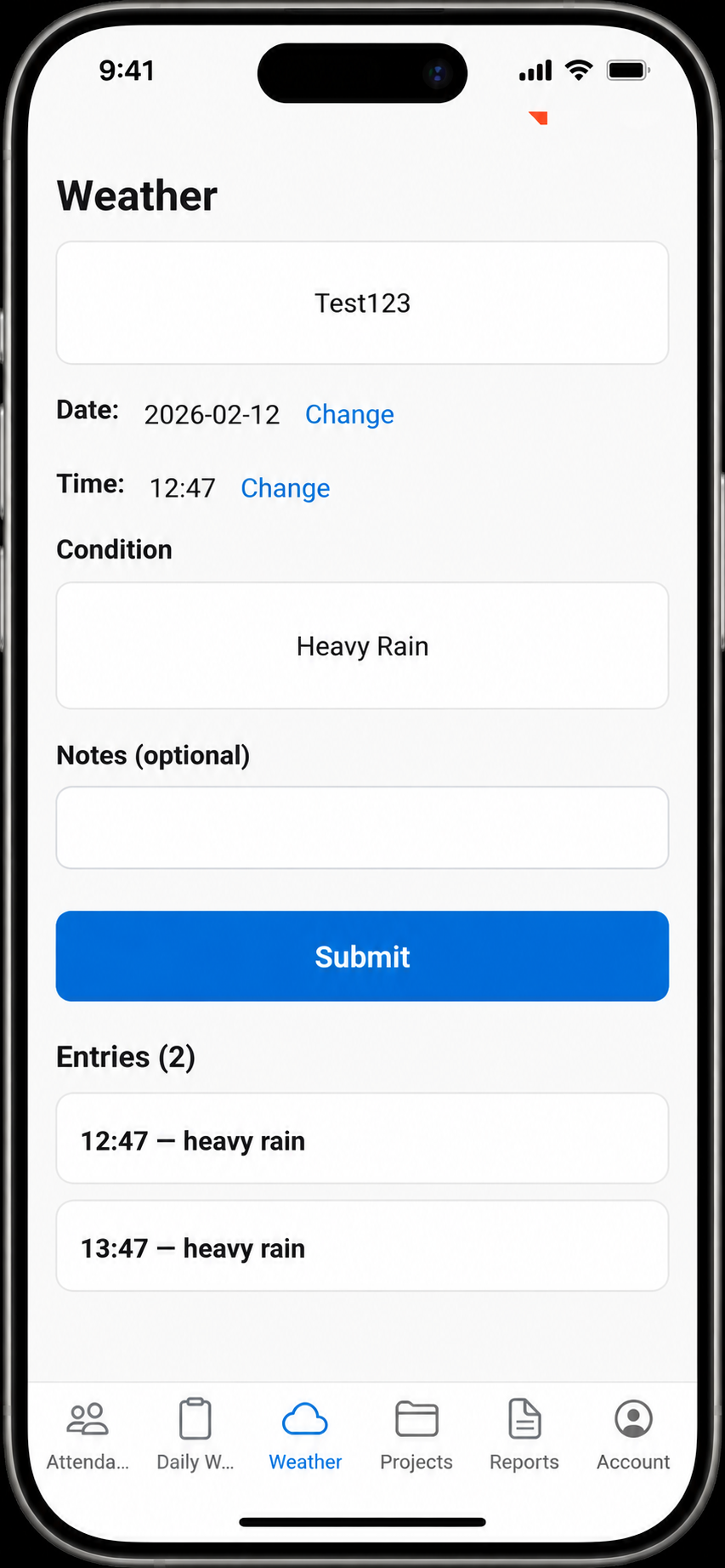
Site personnel record progress on mobile as work happens. BuildMonitor generates the Daily Progress Report automatically in the format your contract requires — no typing, no Excel, no end-of-day admin.
The Daily Progress Report
is still a manual task.
On every construction project, the Site Manager or foreman is contractually required to produce a Daily Progress Report — documenting what work was done, quantities, safety incidents, and issues.
Today, this is still done by typing a report in Excel at the end of a twelve-hour shift. The site team has no time during the day to record structured data. Information is captured from memory, not from observation. By the time the DPR is written, details are forgotten or incorrect.
The report exists only in the format the site manager knows how to create, not necessarily the format the contract requires.
BuildMonitor moves DPR creation from the end of a shift (manual typing in exhaustion) to during the workday (structured data capture on mobile) and then generates the contractually compliant report automatically.
How it works
A structured, compliant process from the field directly to your back office.
Site personnel open BuildMonitor app
Available on Android and iOS. Offline mode for sites with poor connectivity.
Record progress during the workday
Instead of writing from memory at the end of the shift, log work, counts, and issues directly as they occur.
Progress checklist
Which activities completed
Quantities completed
Cubic metres concrete, square metres formwork, etc.
Photos of completed work
With automatic timestamp and location
Safety incidents
Record near-misses and hazards instantly
Issues or delays
Document blockers and reason
Equipment on site
Track machinery status and hours
Labour count
Log subcontractor and trade counts
Information syncs to office
When connection is available (WiFi or mobile data), the logged information syncs automatically to the office system and directly to the ERP.
Daily Progress Report generated automatically
No formatting or compiling. BuildMonitor builds a comprehensive DPR matching contract demands.
Activities completed
With start/end times explicitly listed
Quantities with source
Manually recorded or auto-calculated
Linked Photos
Photos attached to specific activities as evidence
Safety summary
Consolidated list of safety hazards/near-misses
Issues & resolutions
Blockers logged along with resolution status
Labour hours by trade
Aggregated timesheet and subcontractor stats
Equipment hours
Run-time log of site equipment
DPR is contractually compliant
Format matches FIDIC, NEC, JCT requirements (fully configurable). Ready to submit to clients or administrators. Exportable as PDF, email, or direct sync to PM tools.
Core Features
Offline mode
Works on site with no connectivity. Syncs when network is available.
Photo tagging
Timestamp and GPS location automatically recorded with every photo.
Customizable template
Match your contract or client requirements (FIDIC, NEC, JCT, custom).
Multi-language
Supports site teams in local languages for higher compliance and accuracy.
ERP sync
All data flows to your ERP automatically (no double entry).
Fits into your workflow
Seamlessly bridge the gap between site activities and back-office management systems.
Data Input
Site team activity and progress logged directly via mobile recording.
BuildMonitor App
Formats and organizes data points dynamically to generate compliance reports.
Downstream Systems
Automatic data distribution to compliance and financial pipelines.
Workflow pipeline
Pricing & Availability
Per-User License
USD 100 / user / year
Typical project: 3–5 site personnel (so USD 300–500/year per project).
Quick Facts
Why choose BuildMonitor
Traditional Route
- 1+ hour per day per site manager (at end of shift)
- Information from memory, not observation
- Format depends on who is writing (inconsistent)
- No photo evidence linked to progress
- Manual ERP entry (double work)
- Errors in manual data entry
BuildMonitor
- 10 minutes per day (quick checklist + photos)
- Information recorded as work happens
- Format standardized (contract-compliant)
- Photos automatically linked to activities
- ERP updated automatically (no double entry)
- Data quality high (structured capture)
Other Apps
- Require connectivity or work offline poorly
- Don't auto-generate DPRs
- Don't sync to ERP automatically
- Still require manual DPR writing
Frequently Asked Questions
Your DPR should be generated, not typed.
See how BuildMonitor Mobile App eliminates the end-of-day admin burden.